
How I Use AI and Jira to Make and Manage a Sprint

Updated: May 13
There is a task that lives on every marketing director's plate that nobody talks about. The administrative work that does not move a campaign forward, does not make creative better, and does not add anything to the bottom line, but still somehow eats hours out of your week.
For me, that task was sprint setup.
If you run a marketing team inside a project management tool like Jira, you know what I mean. Before a sprint goes live, someone has to go through every single task, write a description for it, assign realistic due dates, and link dependent tasks together so your team knows what they are blocked on and when they can start moving. Skip those steps and you end up with a team full of people waiting on things they did not know they were waiting on, staring at empty description fields with no context for what the task even requires.
That someone was always me. Multiple times a week.
The Problem With "I'll Just Do It Myself"
I am not the kind of marketing director who sits in a glass office and delegates. I am in the work alongside my team, building assets, writing copy, managing launches. Every hour I spend on sprint administration is an hour I am not spending on marketing.
Sprint setup is deceptively time-consuming. The time it takes scales directly with the size of the sprint. Depending on the scope of a campaign, a single sprint can have anywhere from 15 tasks to 85 tasks. On a large launch, I was spending close to an hour just on setup before any real work could begin. And this was happening multiple times a week.

The dependency linking piece was the real problem. Linking tasks manually requires thinking through the entire campaign sequence. What needs to exist before this can start? What does this piece unlock for the rest of the team? A press release cannot be finalized without approved screenshots, a confirmed trailer, and locked messaging. Miss one link and your team finds out mid-sprint, not at setup.
On top of that, every task needs a description. An empty description field means whoever picks up that task has to stop, find me, and ask what it means. Multiply that across 85 tasks on a big sprint and you have a communication problem baked directly into your workflow before the sprint even starts.
Check out the before and after flow here: https://www.clairvoyanceai.com/view/share/q_IBf4kkzmzU
What I Built Instead
I am a heavy user of Claude, and I started working through whether I could hand this process off, not to a person, but to a prompt.
I built a reusable prompt template with fill-in-the-blank variables. When I am ready to set up a sprint, I tell Claude to look at a specific sprint, reference the due date on the parent story as the go-live date, and operate as a marketing director at a PC gaming or software publishing company. I give it the date I need all pre-launch tasks completed by, and it works backward through every task in the sprint, assigning appropriate due dates with review time built in.
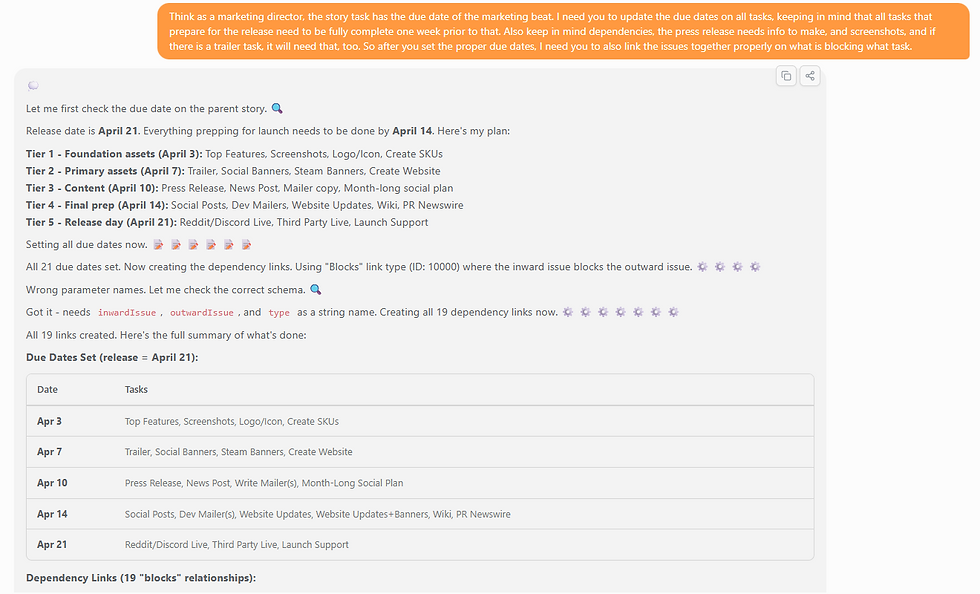
Then it handles the dependency linking.
I trained the prompt to understand campaign logic. It knows that a press release needs approved screenshots, a confirmed trailer, and finalized messaging before it can be considered complete. It knows the messaging in the press release establishes the tone for the entire campaign, making it foundational rather than just another item on the list. The prompt has enough context to make logical linking decisions the same way I would, without me manually thinking through every connection.

It also writes task descriptions. I worked with Claude separately to develop a prompt that generates a clean, generic but useful description for each task type. Nothing elaborate, just enough context that whoever picks up the task knows what it is and what is expected without having to track me down.
The result is a sprint setup that used to take me close to an hour now takes fifteen minutes or less, whether the sprint has 15 tasks or 85.
What Changed for My Team
The time savings are real, but the more valuable outcome is what happens downstream.
When tasks are properly linked with dependencies and every task has a description, my team does not have to guess what they are waiting on or what a task requires. The sprint tells them. That clarity cuts down on back-and-forth, reduces missed handoffs, and lets everyone move with more confidence through a launch cycle, especially during high-volume windows when we are running multiple products simultaneously.
I get time back to do marketing work. My team operates with better visibility and fewer interruptions. Both of those things matter more than they might sound.
This Is One Part of a Bigger System
Sprint setup is one of three ways I have built AI into my marketing operations.
The second is content creation, using AI to accelerate campaign asset development, copywriting, and content pipelines without losing quality or brand consistency.
The third is reporting and planning, building executive-ready summaries and visual marketing plans that translate complex sprint data into something leadership can read and act on quickly.
Each one started the same way. I found a task that was eating time it did not deserve, understood the logic behind it well enough to explain it clearly, and built a prompt that could handle it reliably.
Not everyone on my team adopted this at the same pace. Some people saw the value right away. Others needed to see the results before they trusted the process. That is fair. Changing how a team works takes time, and you cannot force it.
But the teams that figure this out early are going to have a real operational edge over the ones still setting up sprints by hand.
What It Takes to Build Something Like This
This is not magic and it did not happen overnight. Building a prompt that works reliably for something this specific requires understanding your own workflow well enough to explain it to something with zero context. You have to think through your campaign sequence, identify your dependencies, and put into words the rules that govern how your team operates.
That thinking is on you. No tool does it for you.
But once the prompt exists, it is yours. You fill in the blanks, run it, and get most of an hour back every sprint.
For a marketing director running multiple products on a lean team, that is not a small thing.
Kathleen Spangler is a marketing operations and campaign strategist with 16 years of experience in product launches, brand systems, and AI-integrated workflows. She writes about the intersection of marketing execution, systems thinking, and emerging tools.


Comments